欢迎客人!
• 开始前请阅读社区规则确保您顺利的熟悉本社区。注册用户可以提交资源,如果您有已发布资源的新版本,您可以随时更新版本!
• 文件链接损坏请在文件下方留言,我们将会及时更新来自备份服务器的新链接。如有其它问题请 提交工单 和我们联系!【Telegram 频道】【QQ群:5977983】
• 我们拥有多账户检测系统,对于重复注册我们将采取严厉措施!快速获得积分
-
中国新年将至,本站推出优惠活动。所有用户组都将获得由 HuoNiu 开发的 付费插件 优惠20%活动!如果购买多个插件,将在优惠基础上继续实施5%优惠。本活动将持续一个月!
你正在使用过时的浏览器,可能无法正确显示此网站或其他网站。
你应该升级浏览器或使用其他浏览器。
你应该升级浏览器或使用其他浏览器。
过滤器
仅显示:

[OzzModz] Thread Type Vote Competition
- Add-ons
- 4 下载次数
- 0 ratings
Requirements:
XenForo 2.2.0+
Adds new thread type for competitions with up & down voting.
Features:
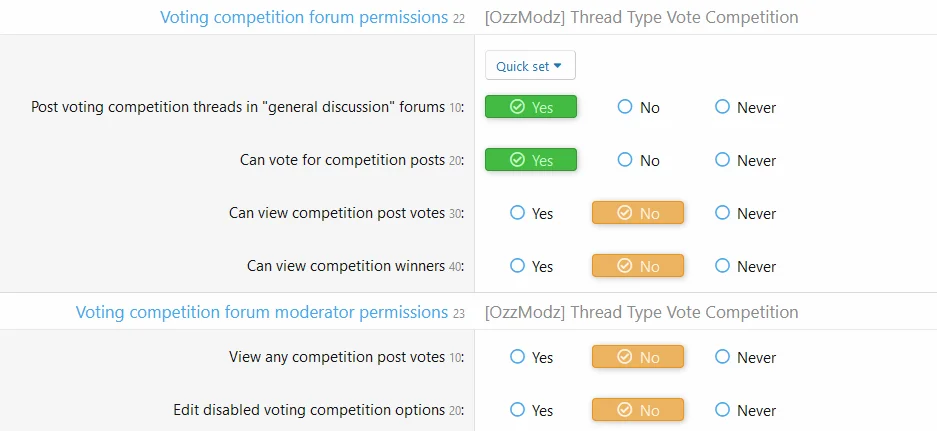
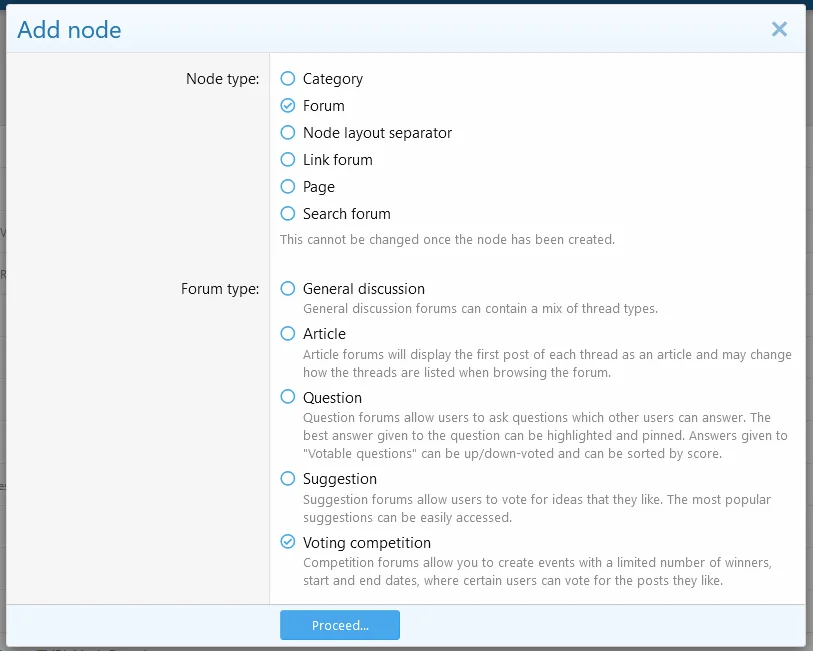
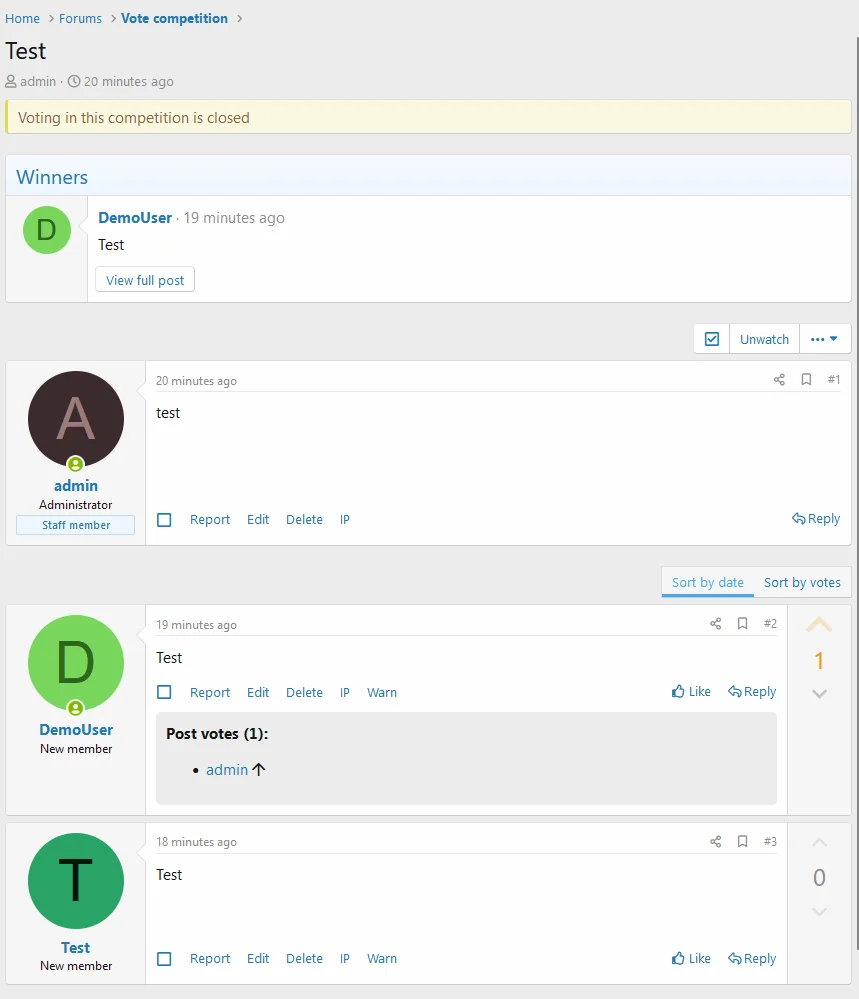
New forum & thread type with post voting support (upvote & downvote)
XenForo 2.2.0+
Adds new thread type for competitions with up & down voting.
Features:
New forum & thread type with post voting support (upvote & downvote)
- General discussion forum type support
- Sort posts by vote score
- Node-specific permissions
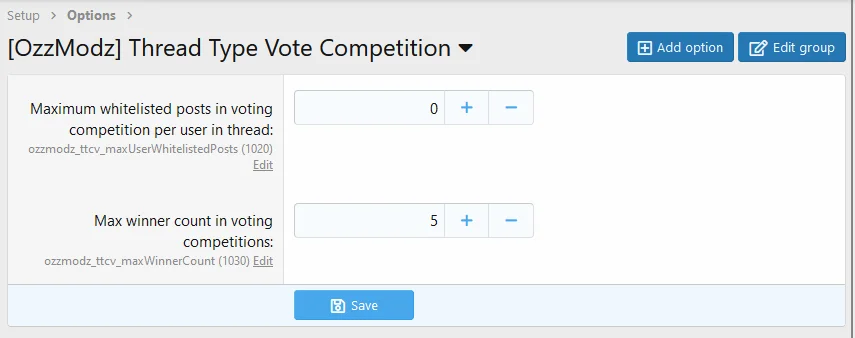
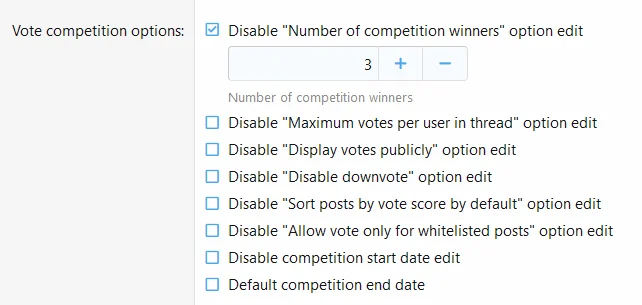
- Thread option to set winners count
- Thread option to sort posts by vote score by default
- Thread option for public display of post votes
- Thread option to start and close competition after exact date or relative unit (days, weeks, months)
- Thread option to disable thread replies on competition ends
- Thread option to limit posts which participate in the competition
- Thread option to limit maximum votes for posts in thread by user
- Thread option to disable downvotes
[XTR] Unlimited Social Sharing Buttons
- Add-ons
- 1 下载次数
- 0 ratings
[XTR] Unlimited Social Sharing Buttons
[XTR] Unlimited Social Sharing Buttons is a full-featured XenForo plugin that lets you add unlimited social networking buttons to your website.
Thanks to the pre-defined social media buttons, you can easily enter your social media link addresses through the admin panel without any coding process. It supports all social media networks. Below is the table related to supported social networks. The table is listed according to the ID of social networks.
| NAME | ID | NAME | ID | NAME | ID |
|---|---|---|---|---|---|
| 500px | 500px | 8track | 8tracks | Alliance | alliance |
| Amazon | amazon | Amplement | amplement | Android | android |
| Angellist | angellist | Apple | apple | Appnet | appnet |
| Baidu | baidu | Bandcamp | bandcamp | Battlenet | battlenet |
| Bebee | bebee | Bebo | bebo | Behance | behance |
| Blizzard | blizzard | Blogger | blogger | Buffer | buffer |
| Chrome | chrome | Coderwall | coderwall | Curse | curse |
| Dailymotion | dailymotion | Deezer | deezer | Delicious | delicious |
| Deviantart | deviantart | Diablo | diablo | Digg | digg |
| Discord | discord | Douban | douban | Draugiem | draugiem |
| Dribbble | dribbble | Drupal | drupal | Ebay | ebay |
| Ello | ello | Endomondo | endomondo | Envato | envato |
| Etsy | etsy | Feedburner | feedburner | ||
| Filmweb | filmweb | Firefox | firefox | Flattr | flattr |
| Flickr | flickr | Formulr | formulr | Forrst | forrst |
| Foursquare | foursquare | Friendfeed | friendfeed | Github | github |
| Goodreads | goodreads | Google+ | googleplus | ||
| Google Scholar | googlescholar | Google Groups | googlegroups | Google Photos | googlephotos |
| Grooveshark | grooveshark | Hackerrank | hackerrank | Hearthstone | hearthstone |
| Hellocoton | hellocoton | Her. /ot Storm | heroes | Hitbox | hitbox |
| Horde | horde | Houzz | houzz | ICQ | icq |
| Identica | identica | Imdb | imdb | ||
| Issuu | issuu | iStock | istock | iTunes | itunes |
| Keybase | keybase | Lanyrd | lanyrd | Last.fm | lastfm |
| Line | line | Livejournal | livejournal | ||
| Lyft | lyft | MacOS | macos | ||
| Medium | medium | Meetup | meetup | Mixcloud | mixcloud |
| Model Mayhem | modelmayhem | Mumble | mumble | MySpace | myspace |
| Newsvine | newsvine | Nintendo | nintendo | NPM | npm |
| Odnoklassniki | odnoklassniki | OpenID | openid | Opera | opera |
| Outlook | outlook | Overwatch | overwatch | Patreon | patreon |
| PayPal | paypal | Periscope | periscope | Persona | persona |
| Play | play | Player | player | ||
| Playstation | playstation | ||||
| Quora | quora | Raidcall | raidcall | Ravelry | ravelry |
| Renren | renren | Researchgate | researchgate | ||
| Resident Advisor | residentadvisor | Reverbnation | reverbnation | RSS | rss |
| Sharethis | sharethis | Skype | skype | Slideshare | slideshare |
| Smugmug | smugmug | Snapchat | snapchat | Songkick | songkick |
| Soundcloud | soundcloud | Spotify | spotify | Stackexchange | stackexchange |
| Stackoverflow | stackoverflow | Starcraft | starcraft | Stayfriends | stayfriends |
| Steam | steam | Storehouse | storehouse | Strava | strava |
| Streamjar | streamjar | Stumbleupon | stumbleupon | Swarm | swarm |
| Teamspeak | teamspeak | Teamviewer | teamviewer | Technorati | technorati |
| Telegram | telegram | Tripadvisor | tripadvisor | Tripit | tripit |
| Triplej | triplej | Tumblr | tumblr | Twitch | twitch |
| Uber | uber | Ventrilo | ventrilo | ||
| Viadeo | viadeo | Viber | viber | Viewbug | viewbug |
| Vimeo | vimeo | Vine | vine | vKontakte | vkontakte |
| Warcraft | warcraft | ||||
| Wikipedia | wikipedia | Window | window | ||
| Wordpress | wordpress | Wykop | wykop | XBox | xbox |
| Yahoo | yahoo | Yammer | yammer | ||
| Yandex | yandex | Yelp | yelp | YouNow | younow |
| YouTube | youtube | Zapie | zapie | Zerply | zerply |
| Zomato | zomato | Zynga | zynga |
Installation:
- XENTR-SocialMedia-1.0.0.zip and unzip it.
- Copy the upload/src/addons/XENTR/SocialMedia directory to your server.
- From the Admin Control Panel Install the add-on.
- Admin Options setings admin.php?options/groups/xtr_social_media/
- You can configure the [XTR] Social Media plug-in from the Style properties page.
- [XTR] Allow members of the Social Media add-in from the Member groups and permissions field.
- Archive installation / upgrade: Tested.
Add/Plugins [Xen-Soluce] Like or Reply to Download Resources
- Add-ons
- 3 下载次数
- 0 ratings
Description :
- This add-on requires your members to like or respond to discussions before they can download resources.
- Options :
- Enable
- Choose restriction type :
- Reply and like
- Reply only
- Like only
- Reaction type :
- All reactions authorize
- That the reactions with a positive score
- Select the expected reactions
- Reply and like :
- Exclude category
- Exclude user group
- Reply only :
- Exclude category
- Exclude user group
- Like only :
- Exclude category
- Exclude user group
- Permission :
- User : Can edit the parameters of like reply
- This add-on does not include branding.
- Download and unzip it.
- Copy the src/addons/XenSoluce/LikeReplyDownloadRM directory to your server.
- From the AdminCP install the add-on.
- Don't hesitate to leave a rating : Leave a rating !
[XTR] Unlimited Prefix Styles
Compatible XF 2.x versions
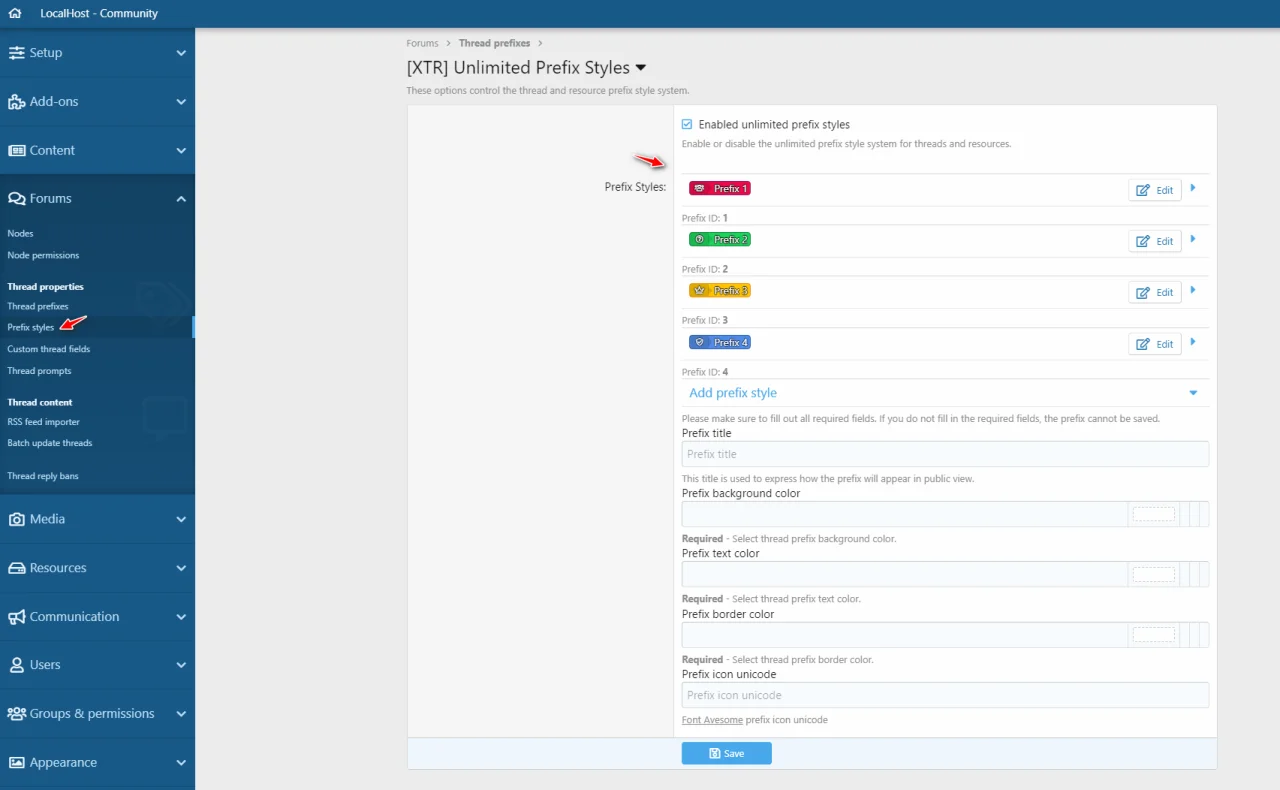
This add-on allows you to create unlimited prefix styles and you may select them easily per each prefix.
XenForo 2.2.x Compatibility
ACP Options
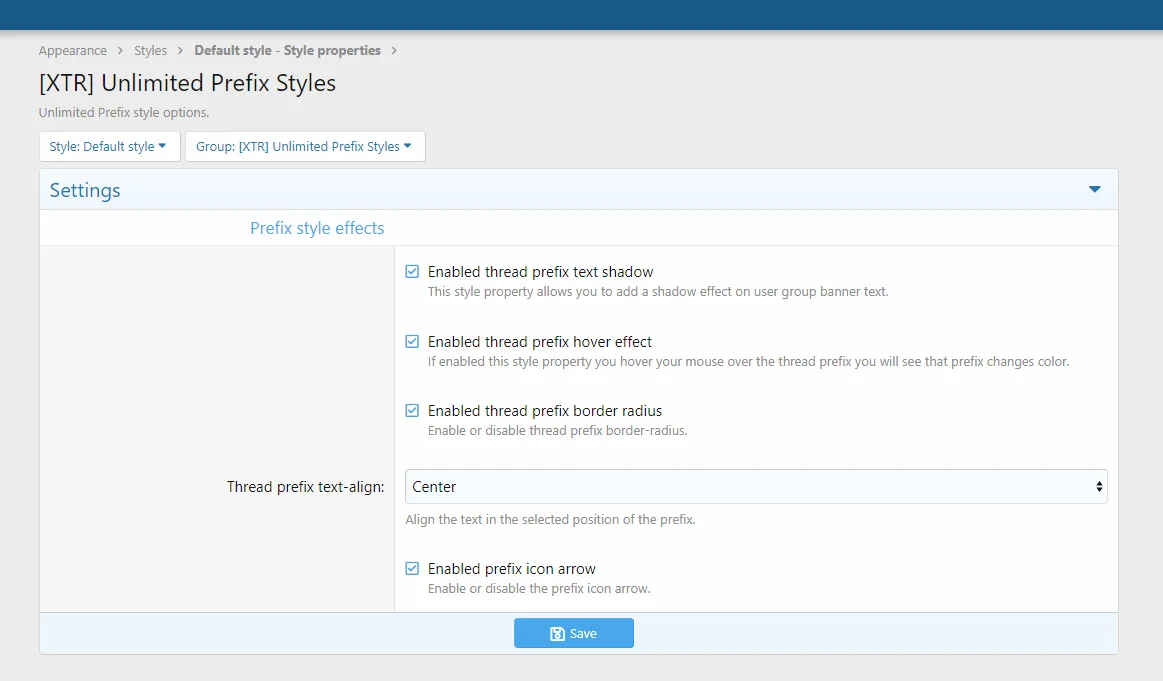
Style Properties
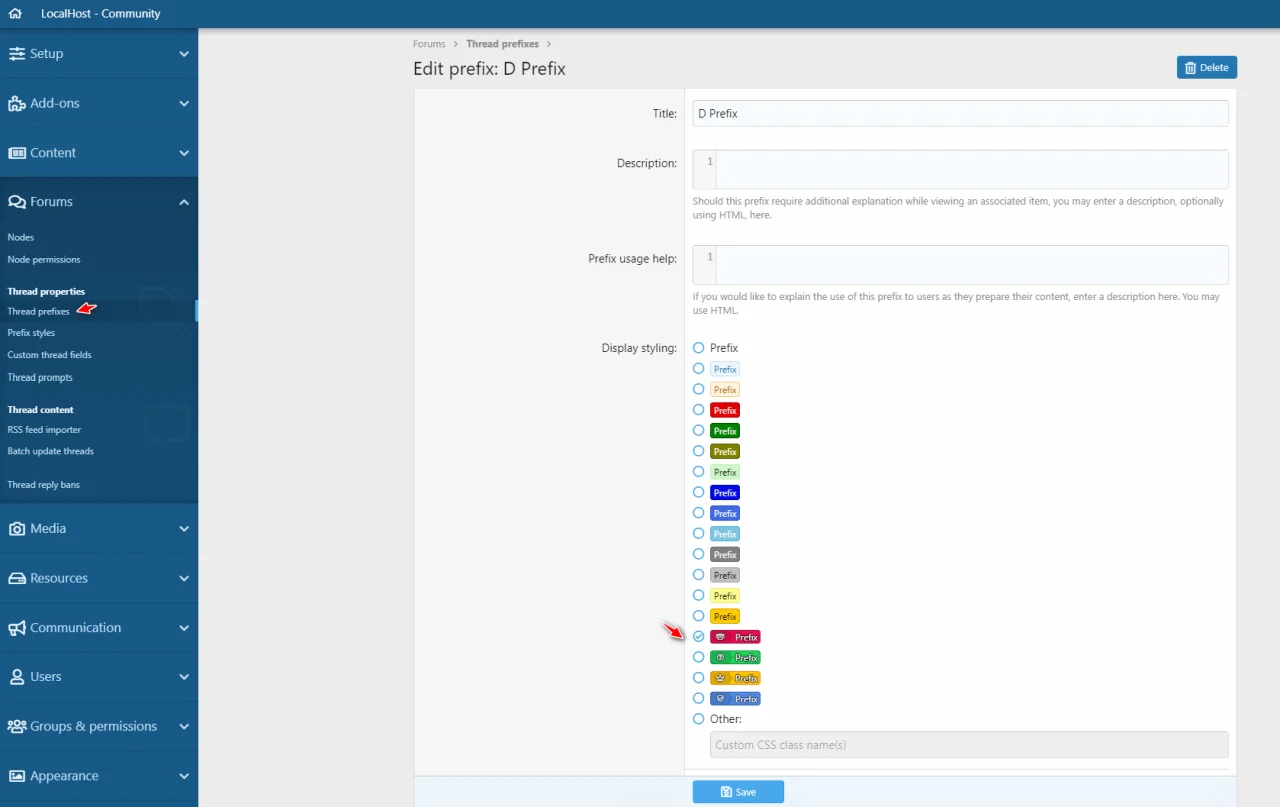
Thread Prefix
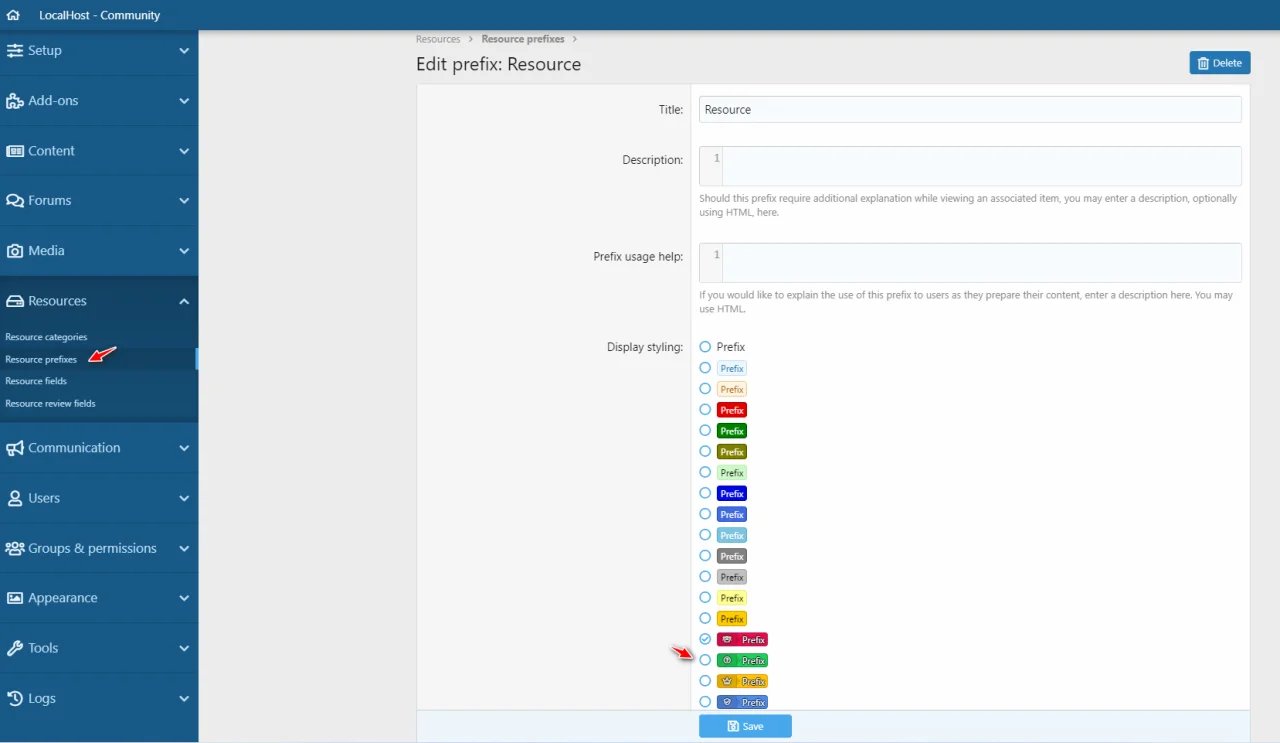
Resource Prefix
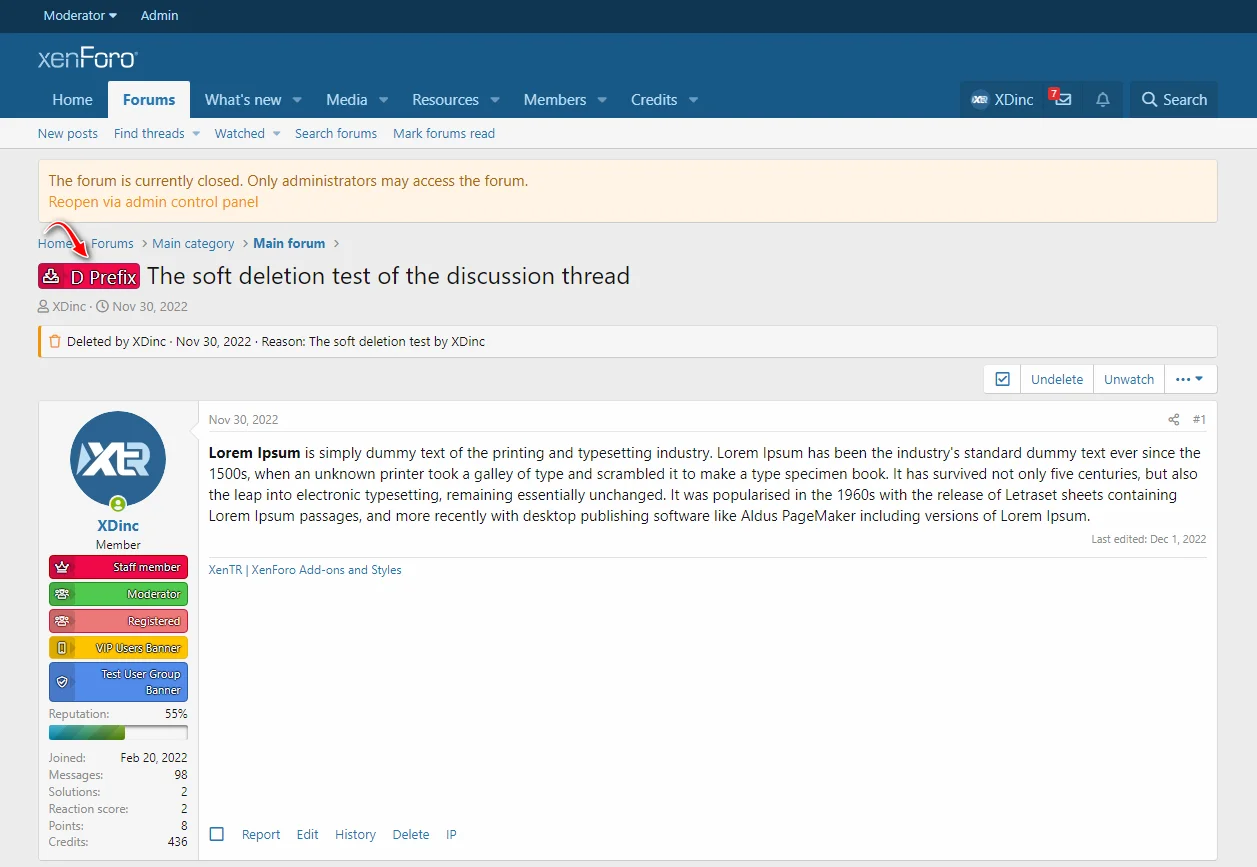
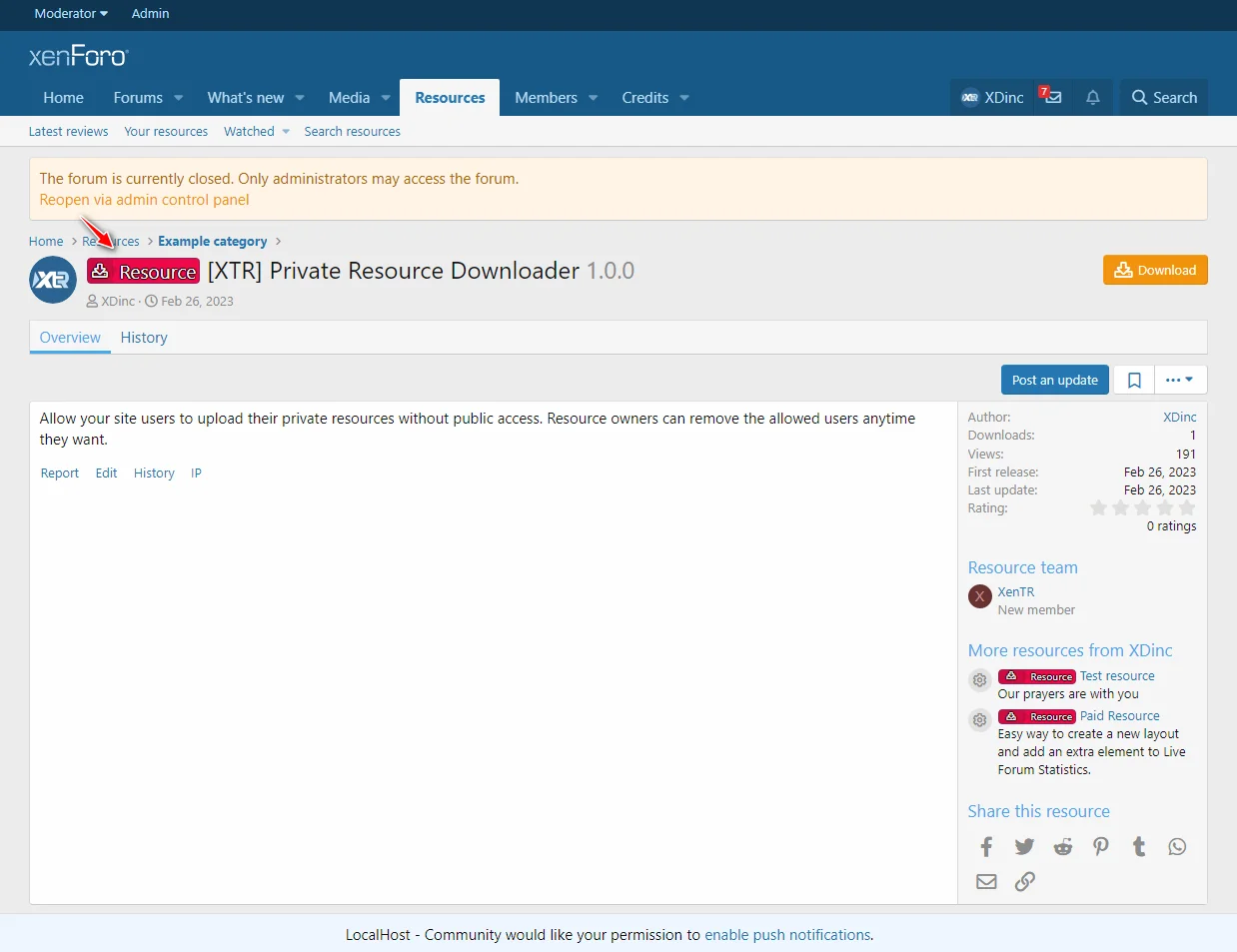
Public View
Features
- 2.2
This add-on allows you to create unlimited prefix styles and you may select them easily per each prefix.
XenForo 2.2.x Compatibility
- Requires PHP 7.2+
- Supports only XF 2.2.2+
ACP Options
Style Properties
Thread Prefix
Resource Prefix
Public View
Features
- Adding unlimited style
- Define to easily
- Prefix style effects
- Enable or disable the prefix style system
[XTR] Thread Rating System
- Add-ons
- 0 下载次数
- 0 ratings
Compatible XF 2.x versions
Ratings let us know what you find important and feel should be acknowledged - it gives you a say in what goes on in the forum, and lets other people know that you value and appreciate the time given by those who share their knowledge!
Threads rated with three to five stars can also lead to informative tutorials or articles.


RATING A THREAD
When you come across a thread that you think should be rated, all you have to do is simply scroll up to the very first post on the screen.
Along the top toolbar, you'll see an option called 'Leave a Rating.' Clicking on this button will bring down a menu in which you can rate your thread.
Simply click to tell us if you think it is Excellent, Good, Average, Poor or Terrible and then hit 'Vote Now' to register your opinion. You will then be taken back to the thread.


So what kind of thread actually deserves to be recognized? Well, that all depends on what kind of information you find valuable. If you are asking a question and receive several well thought-out, informative replies that you know are going to help you - then rate the thread! If you're looking for information and find something that you think you'll be able to use - rate the thread! If you're just browsing the forum and you see threads that have received a lot of information that may not necessarily be of value to you, but you see other people getting a lot from it - rate the thread!
Rate it! Basically, if you find the information useful, and if you think other people will find it useful too, then rate it - Just rate it!
- 2.2
Ratings let us know what you find important and feel should be acknowledged - it gives you a say in what goes on in the forum, and lets other people know that you value and appreciate the time given by those who share their knowledge!
Threads rated with three to five stars can also lead to informative tutorials or articles.
RATING A THREAD
When you come across a thread that you think should be rated, all you have to do is simply scroll up to the very first post on the screen.
Along the top toolbar, you'll see an option called 'Leave a Rating.' Clicking on this button will bring down a menu in which you can rate your thread.
Simply click to tell us if you think it is Excellent, Good, Average, Poor or Terrible and then hit 'Vote Now' to register your opinion. You will then be taken back to the thread.
So what kind of thread actually deserves to be recognized? Well, that all depends on what kind of information you find valuable. If you are asking a question and receive several well thought-out, informative replies that you know are going to help you - then rate the thread! If you're looking for information and find something that you think you'll be able to use - rate the thread! If you're just browsing the forum and you see threads that have received a lot of information that may not necessarily be of value to you, but you see other people getting a lot from it - rate the thread!
Rate it! Basically, if you find the information useful, and if you think other people will find it useful too, then rate it - Just rate it!
- Compatible with all node type.
- You can select applicable nodes.
- Rating alert system.
- Visible rating stars on google search result.
[XTR] Resource Manager Layout
Compatible XF 2.x versions
This add-on has been developed with the intention of enhancing the XenForo Resource Manager add-on visually and providing ease of use.
 Also it allows you to customize the standard resource manager pages of XenForo.
In addition, the style structure has the ability to edit the relevant fields you want to change easily through the panel without any coding to customize it.

As you known, XenForo supports the square or circle picture format since 1.x versions. If we want to change the thumbnail size of resource icon on the resources owerview, thumbnails structure are deteriorates.
But if you have a Resource Pages add-on you can solve this problem in a very simple way and customize your resource pages as you wish.
As you see the picture is below, it is possible to set resource icon images to your desired size.

Note: To have a better-looking resource list, it is recommended that you update the icons of existing products again according to the dimensions you have specified.
Apart from these style features, you can easily manage almost every section of the resource manager page.
You may review the style properties with following image,

[XTR] Resource Manager Layout Features

Sometimes you may need a special button when adding resources. Like as your demos!
You can easily add the link for your demo URLs.


Note: Please do not install the add-on, if you are using lower than XF 2.2.x
This version only support to XenForo 2.2.x +.
- 2.2
This add-on has been developed with the intention of enhancing the XenForo Resource Manager add-on visually and providing ease of use.
In addition, the style structure has the ability to edit the relevant fields you want to change easily through the panel without any coding to customize it.
As you known, XenForo supports the square or circle picture format since 1.x versions. If we want to change the thumbnail size of resource icon on the resources owerview, thumbnails structure are deteriorates.
But if you have a Resource Pages add-on you can solve this problem in a very simple way and customize your resource pages as you wish.
As you see the picture is below, it is possible to set resource icon images to your desired size.
Note: To have a better-looking resource list, it is recommended that you update the icons of existing products again according to the dimensions you have specified.
Apart from these style features, you can easily manage almost every section of the resource manager page.
You may review the style properties with following image,
[XTR] Resource Manager Layout Features
- Fully responsive compatible with all devices. You may define the number of columns per each devices.You may shape as you want.
- You can hide or show resource categories for desktop devices.
- You can also hide or show resource categories for mobile devices.
Sometimes you may need a special button when adding resources. Like as your demos!
You can easily add the link for your demo URLs.
- It adds a price ribbon for your paid resources.
- You may enable or disable any resource extra info elements under the resource icon.
- The sidebar comes as sticky.
- It adds a resource owner section with author avatar.
- Attached images are now with carousel slider, In this way, a very fast viewing facility offers comfortable ease of use.
Note: Please do not install the add-on, if you are using lower than XF 2.2.x
This version only support to XenForo 2.2.x +.
[XTR] Resource Downloader User Groups
- Add-ons
- 1 下载次数
- 0 ratings
Compatible XF 2.x versions

Allows setting which user groups can download the resource by when adding or editing resources.
Let's time to define which user groups can download the resource.
Moreover, One-Click!
Public view,


Resource Category Option

ACP Options

Feature list
- 2.2
Allows setting which user groups can download the resource by when adding or editing resources.
Let's time to define which user groups can download the resource.
Moreover, One-Click!
Public view,
Resource Category Option
ACP Options
Feature list
- Manage by category.
- Downloader user group selection.
- Different information styles. (Button or block)
- Different block styles.
- Confirm XF 2.2.9+ Support
- PHP 8.1 Compatibility
- PHP 8.0+
[XTR] Banned Users List
- Add-ons
- 0 下载次数
- 0 ratings
[XTR] Banned Users List - Yasaklı Kullanıcılar Listesi
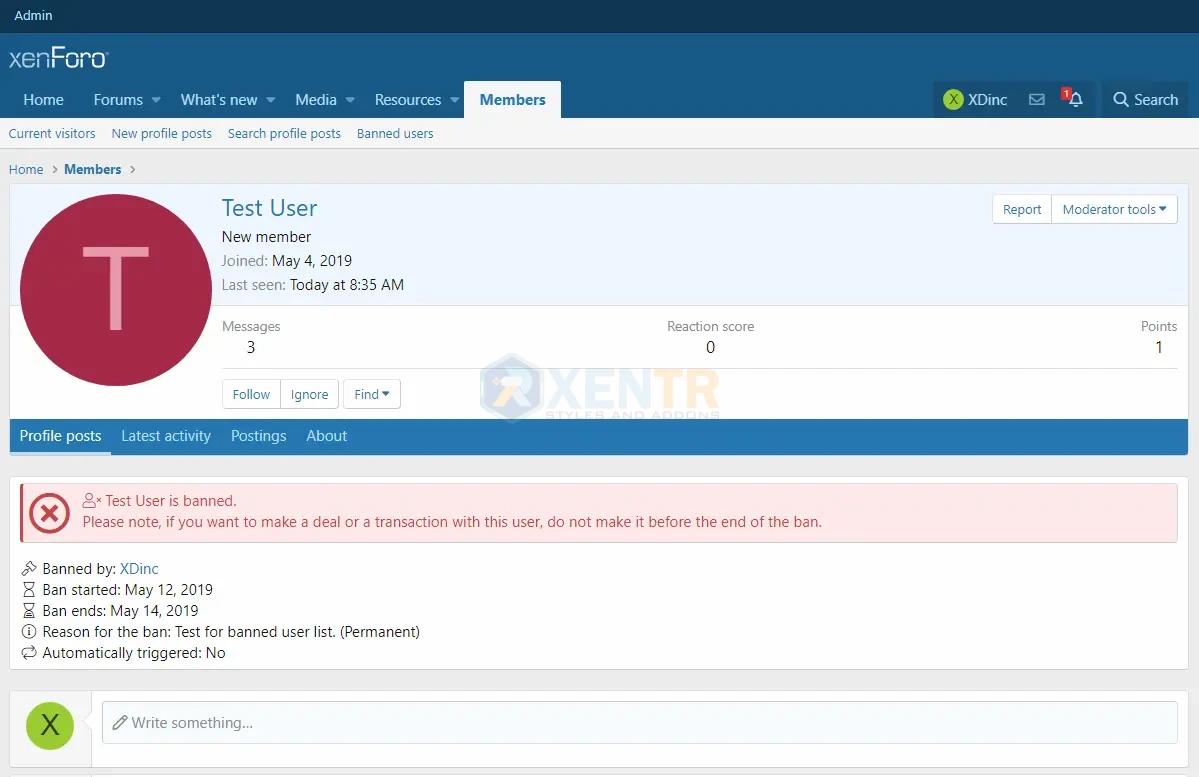
Adds a page for the list of banned members.
You can view, which users are banned by who and when the banned time will be end?...
Options
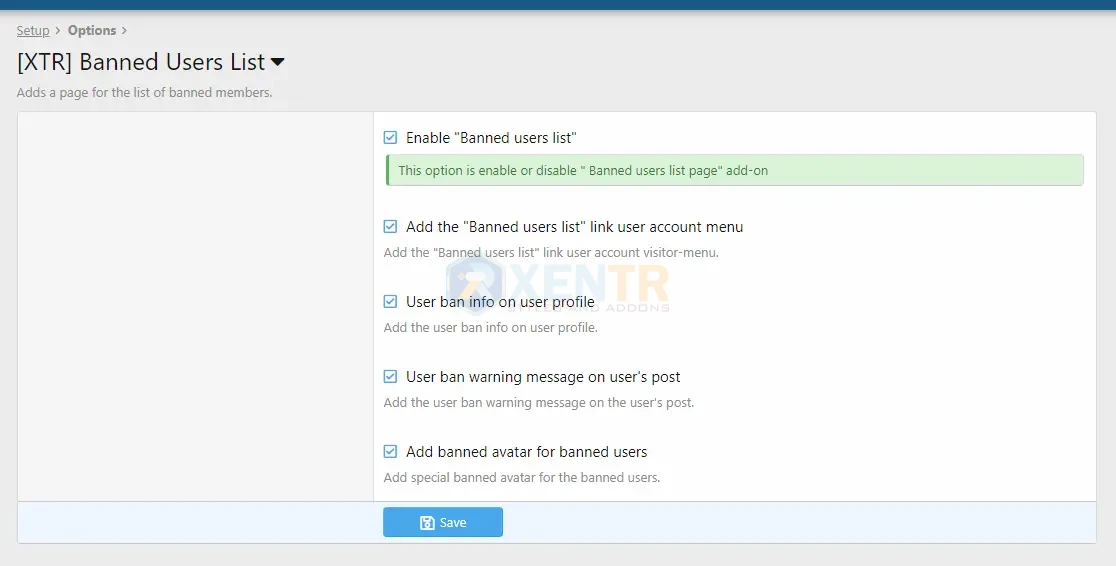
Set to permission to view banned users list!
Forum mod. per => View banned users page
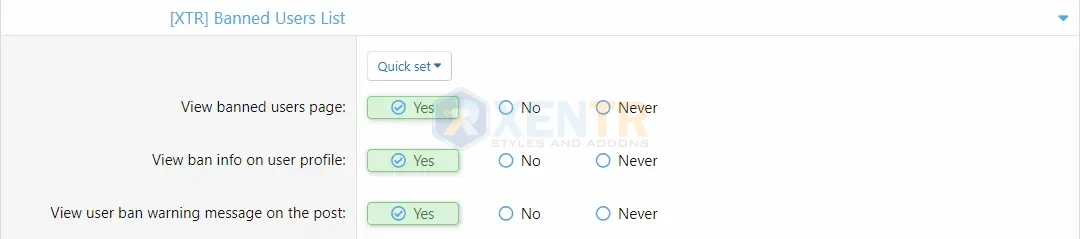
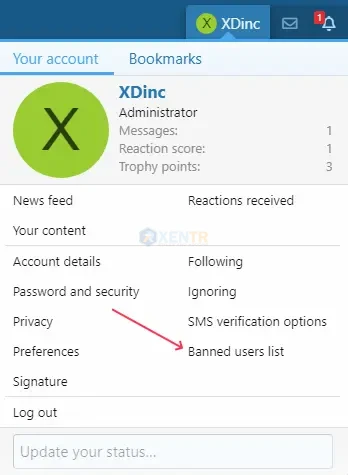
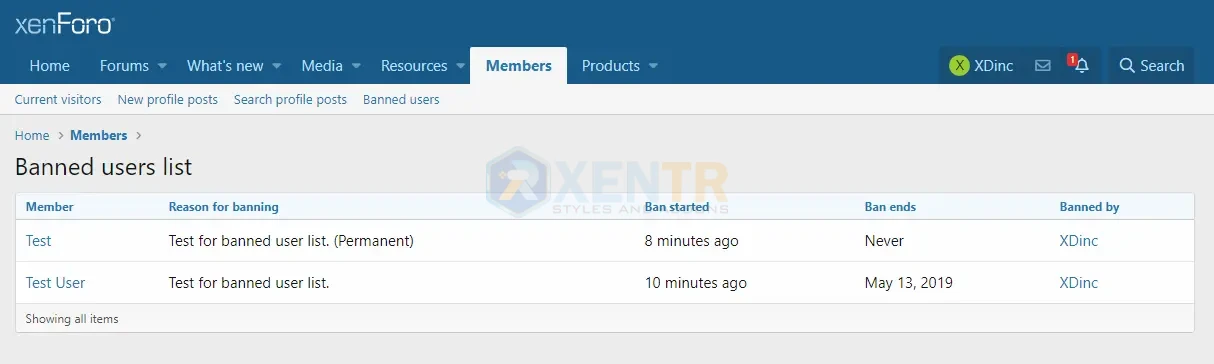
Add the user ban info on user profile.
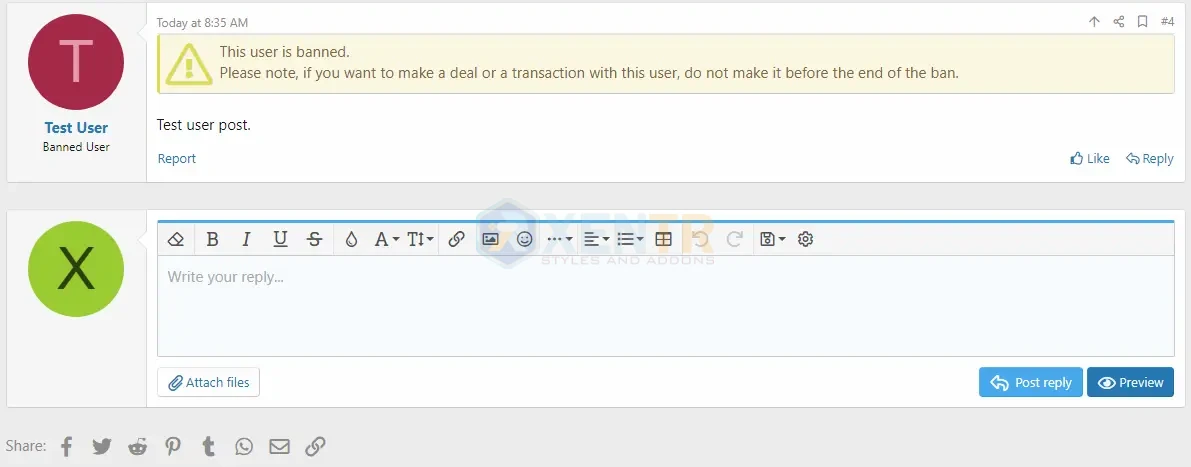
Add the user ban warning message on the user's post.
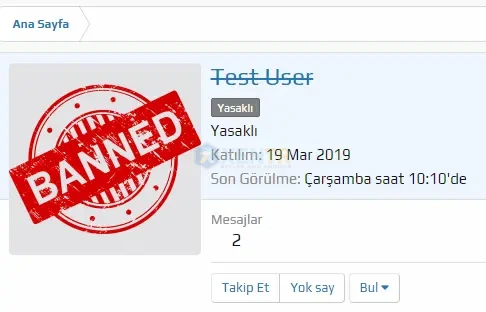
Add banned avatar for banned users
Adds a page for the list of banned members.
You can view, which users are banned by who and when the banned time will be end?...
Options
Set to permission to view banned users list!
Forum mod. per => View banned users page
Add the user ban info on user profile.
Add the user ban warning message on the user's post.
Add banned avatar for banned users
[XTR] Account Upgrades Page
- Add-ons
- 3 下载次数
- 0 ratings
The [XTR] Account Upgrades Page is an essential tool that allows you to generate income while making your community more attractive. Offering options that fit users' needs and highlighting benefits will help your community grow and thrive.
Customize Community Experience in XenForo: Stand Out with the New [XTR] Account Upgrades Page
The growth and development of online communities are made possible by offering users more privileges and especially account upgrade options. The highly flexible and expandable structure provided by the XenForo platform presents a fantastic opportunity for community administrators: Creating a personalized Account Upgrade Page tailored to their needs and community dynamics.
[XTR] Account Upgrades Page: A Feature-Rich Experience
XenForo's new Account Upgrade Page offers community administrators numerous customization options. You can now present your account upgrade packages in a more attractive and user-friendly manner.
Here are the advantages of this feature-packed page:
Flexible Description Editing: Editing the description area of your account upgrade packages is made simple using HTML tags. You can emphasize your headings using <h3> and <h4> tags, and you can write your text until the end of each line without using the <br> tag. Thanks to the plugin's feature, you can visually edit your descriptions as well.
Advanced Sidebar Editing: You can edit the content explaining the account upgrade packages in the sidebar as you wish. With XenForo's built-in advanced editor, you can visually enrich your content and present it to users.
Highlight a Package: You have the ability to spotlight a specific account upgrade package. This allows you to prominently present advantageous packages to your users.
Distinct Background Colors for Each Package: You can assign different background colors to each account upgrade package. These color choices help create a more visual and engaging structure.
Image Banners for the Sidebar: You can upload distinct image banners for each package to be displayed in the sidebar. These banners include the package names and Font Awesome icons assigned to the packages on the left side.
Custom Font Awesome Icons for Each Package: You can input a unique Font Awesome icon code for the background and banner that will appear for each package. This enhances the overall visual appeal.
Optional Sidebar Control: With this new feature, you can choose whether or not to display the sidebar on the account upgrade page. This provides both administrators and users with the flexibility to toggle this feature on and off.
Expandable Title Sections: Considering the possibility of extensive content in description fields, we've also implemented collapsible title sections to maintain readability.
Limited Content Display: For managing longer descriptions, you can implement a feature that displays content up to a certain point, providing a more manageable reading experience.
In Conclusion
With new [XTR] Account Upgrades Page, community administrators have access to a wide range of customization options, allowing them to enhance the attractiveness and interactivity of their communities. Offering a variety of packages tailored to users' needs and presenting them in a visually striking manner can greatly contribute to community growth and engagement.
Leverage this newly enhanced [XTR] Account Upgrades Page with its array of features to elevate your XenForo community's potential and deliver an unforgettable user experience. Empower both administrators and users with customization options that set your community apart.
You can watch the video for detailed information.
Related resources
Note: You should purchase the User Upgrade Durations add-on from the developer through the link provided below:
User Upgrade Durations Add-On


